
Kijauk A terminal theme
A modern developer-focused Oh My Posh theme designed for clean workflows, Git awareness, and runtime visibility.
About
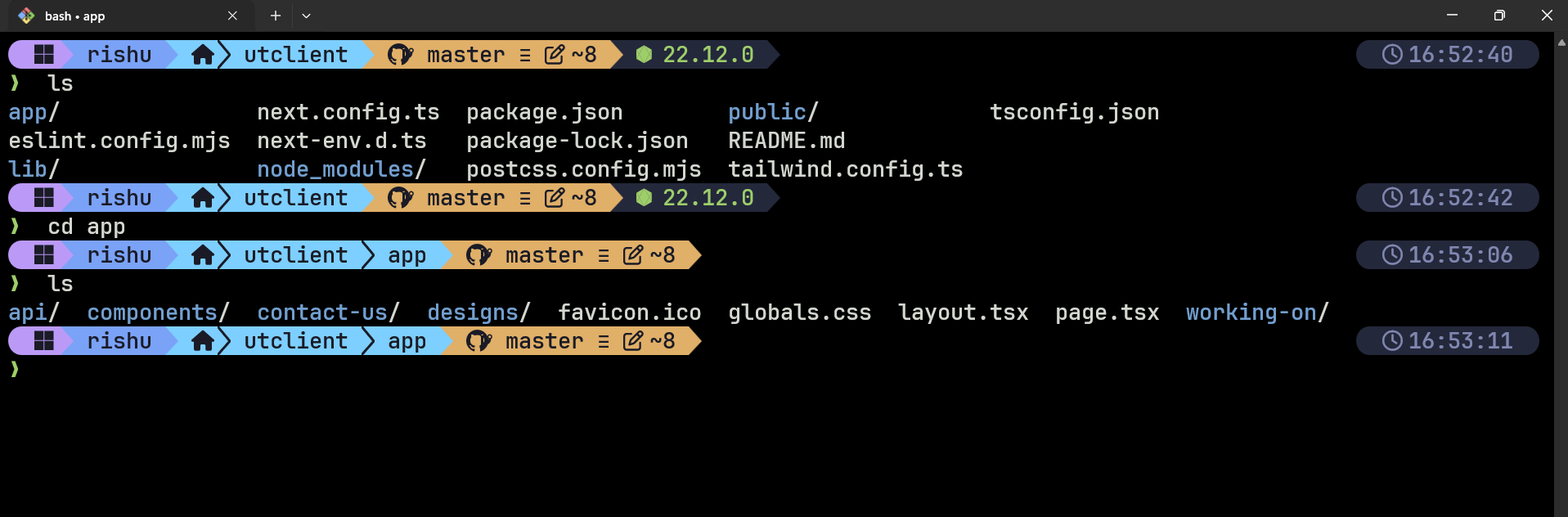
Kijauk is a handcrafted Oh My Posh terminal theme built for developers who want a terminal that is both visually appealing and highly functional.
The theme focuses on providing essential development context without overwhelming the terminal with unnecessary visual clutter. It combines a modern segmented layout, Git awareness, runtime visibility, and clean typography to create a productive command-line experience.
Whether you're working on web applications, cloud infrastructure, automation scripts, or open-source projects, Kijauk is designed to keep important information visible while maintaining a clean and distraction-free workflow.
Repository Link
kijauk-theme-githubrepo-click-here
Features
Clean and Modern Design
- Minimal visual noise
- Balanced spacing and segment layout
- Easy-to-read typography
- Professional appearance suitable for daily development
Git Awareness
Quickly view repository information directly from your prompt:
- Current branch
- Git status indicators
- Repository context
- Clean repository visualization
Runtime Visibility
Instant access to runtime information such as:
- Node.js version
- Python version
- .NET version
- Other supported runtimes
Developer Focused
Designed around real development workflows:
- Works well with large repositories
- Optimized for daily terminal usage
- Consistent appearance across environments
- Suitable for cloud, backend, frontend, and DevOps work
Preview
Theme Preview

Additional Screenshot
Requirements
Before using the theme, ensure the following are installed:
- Oh My Posh
- Windows Terminal (Recommended)
- PowerShell 7 or Git Bash
- A Nerd Font
Recommended Fonts
- Cascadia Code Nerd Font
- Cascadia Cove Nerd Font
- JetBrainsMono Nerd Font
These fonts provide the icons used throughout the theme.
Install Oh My Posh
If Oh My Posh is not already installed, follow the official installation guide:
https://ohmyposh.dev/docs/installation
Once installed, continue with the theme setup below.
Download the Theme
Create a theme directory and download the theme file:
mkdir -p ~/.poshthemes

curl -L \
https://raw.githubusercontent.com/kinshukjainn/kijauktheme/main/themes/kijauk.omp.json \
-o ~/.poshthemes/kijauk.omp.json
Git Bash Setup
Add the following line to your .bashrc file:
eval "$(oh-my-posh init bash --config ~/.poshthemes/kijauk.omp.json)"
Reload your shell:
source ~/.bashrc
PowerShell Setup
Open your PowerShell profile:
notepad $PROFILE
Add the following line:
oh-my-posh init pwsh --config "$HOME\.poshthemes\kijauk.omp.json" | Invoke-Expression
Save the file and restart PowerShell.
Recommended Environment
For the best experience, I recommend:
Customization
Since Kijauk is built using Oh My Posh, you can easily customize it:
- Modify segment ordering
- Change icons
- Adjust colors
- Add new runtime segments
- Customize Git indicators
- Add cloud provider information
The theme file is a standard Oh My Posh configuration and can be edited using any text editor.
Philosophy
Kijauk was created with a simple goal:
Deliver essential developer context at a glance while maintaining a clean, elegant, and distraction-free terminal experience.
Many themes prioritize aesthetics at the expense of usability. Kijauk aims to balance both by providing meaningful information without turning the prompt into a wall of text.
The result is a terminal theme that feels professional enough for everyday work while remaining visually distinctive and enjoyable to use.
About the Author
Kinshuk Jain
Cloud enthusiast, developer, and builder focused on modern web technologies, cloud infrastructure, and developer tooling.
Links
- Website: https://cloudkinshuk.in
- Blogs: https://cloudkinshuk.in/blogs
- Feedbacks: https://clkfeedbacks.cloudkinshuk.in
Feedback
If you use Kijauk, I'd love to hear your thoughts.
Suggestions, bug reports, and improvement ideas are always welcome.
Feedback Portal:
https://clkfeedbacks.cloudkinshuk.in
License
This project is licensed under the MIT License.
You are free to:
- Use
- Modify
- Customize
- Distribute
- Fork
the theme according to the terms of the MIT License.
See the LICENSE file for complete details.